
Home / Labour Decision Intelligence
Plan the right labour for the work.
Warehouse workforce planning starts with the work. Predict how much your operation can realistically process, then optimise the labour needed by task and time period, within skills, capacity and service constraints.
Request a demo ↗Watch the product videoThe right decision for every planning horizon.
LDI supports decisions from future capacity and budgets through to the work remaining in today’s shift.
- Months aheadStrategic
Can we support future demand?
Explore capacity, labour budgets and staffing assumptions.
- Weeks aheadMedium-term
What labour should we plan?
Compare demand, working patterns and resource options before peak periods.
- Days aheadShort-term
What labour should we commit?
Refine cover and decide on agency bookings and overtime.
- Hours aheadIntraday
How should we respond?
Recalculate labour needs and priorities as conditions change during the shift.
One connected plan, refined as the work gets closer and needs change.
Intraday planning
When the shift changes, replan in minutes.
Unexpected demand, equipment breakdowns, sickness or late arrivals can put the shift under pressure. Replan the remaining work around the hours available and the deadlines still to meet.
 See what changed
Update workload, productivity or available hours against the current plan.
 Check the remaining work
Review capacity, priorities and the deadlines still to meet.
 Approve the response
Choose the revised plan and align scheduling and task allocation with it.
The response depends on current inputs and the warehouse’s operating constraints. Managers retain approval.
Watch intraday replanning →Understand the impact before you commit.
Scenario modelling
Test a change before committing people or budget. See whether a revised plan can meet demand, what it would cost and where service may be at risk.
A last-minute promotion. More demand than planned.
You already have an approved labour plan. A sales promotion is announced before the extra demand appears in the forecast. Can the warehouse handle the increase and still meet its commitments?
Test the extra demand
Increase expected demand for the relevant department and days. Record the reason, then generate a revised plan using productivity, available hours and operating constraints.
See what it takes
Compare the proposal with the approved plan. See the labour required, expected throughput and cost, and whether customer commitments can still be met.
What if extra labour isn’t available?
Set the actual limits on agency, overtime or available hours and replan. See what can still be completed and where service may be at risk.
What the comparison looks like in LDI.
Compare the current and draft plans across service commitments, labour cost and planned hours.
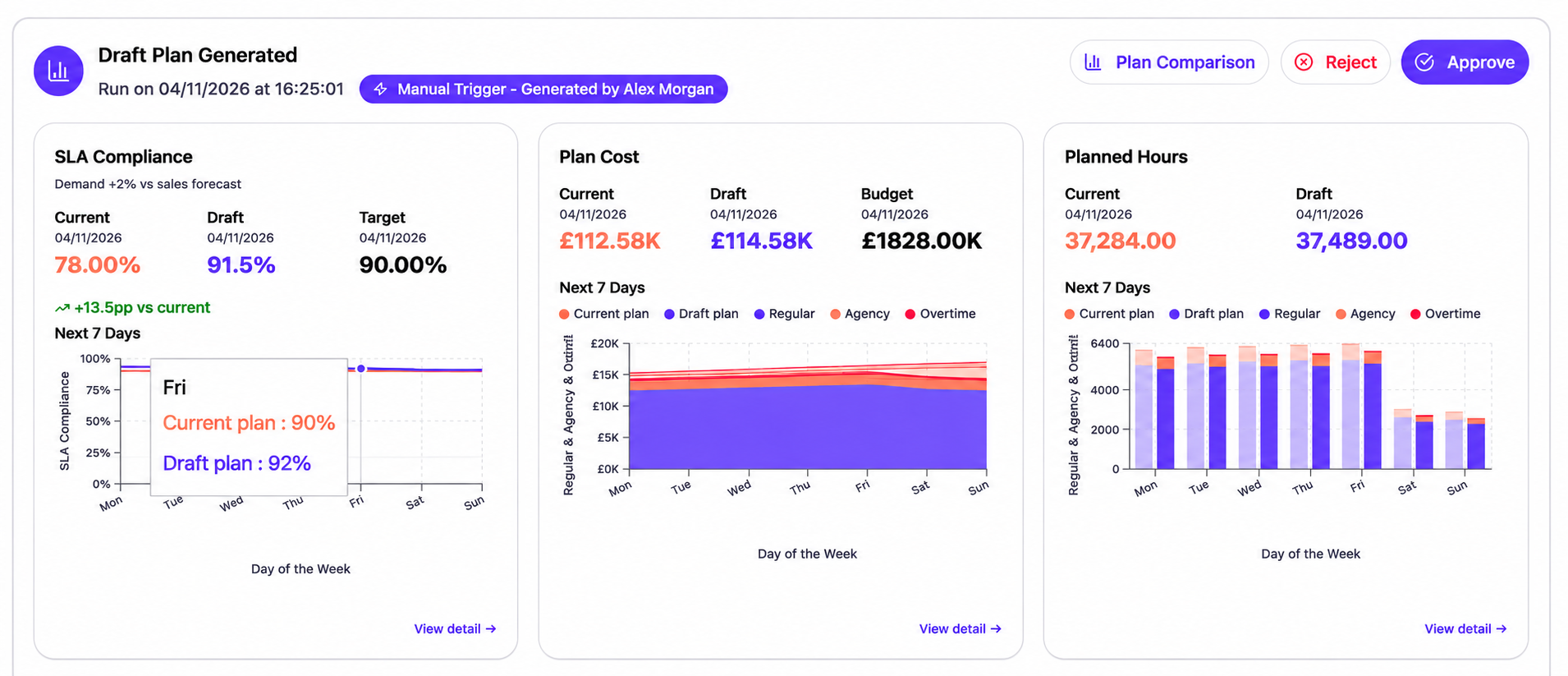
Swipe across to see the full comparison.
Approve the plan you can put into action.
Review the trade-offs, then approve or reject the proposal. Until you approve a revision, the operation continues to work to the current plan.
One shared plan. One version of the truth.
Planners and warehouse managers contribute to the same plan, without passing spreadsheets back and forth.

Build the plan together
Bring updates and local knowledge into one place. Review assumptions with the people who know the operation, so the plan reflects what can happen on the floor.
Explore without confusion
Teams contribute to a shared proposal, so everyone can review the combined changes before it is submitted for planning.
Stay aligned as plans change
Once revisions are approved, planners and shift managers share the current plan. Retained assumptions, revisions and approvals show what changed and how the decision was reached.
“Team Leaders were required to spend significant time away from operations to complete resource planning.”
Describing the original planning process.
Put the approved plan to work.
LDI determines the labour needed by task and time period. Your scheduling tools, or the optional Intelligent Deployment add-on, connect those requirements to individual people.
Keep your existing scheduling tools
Connect LDI to your WFM, scheduling or HR scheduling system. Your team uses the revised requirements to review cover and allocate people.
Explore integrations →Add Intelligent Deployment
Bring shifts and task allocation into Predyktable, matching people to the plan using their skills, availability and scheduled hours.
Explore the optional LDI add-on →Your questions, answered
What does LDI optimise beyond the number of labour hours?
LDI considers when work should be processed and how labour should be allocated across the planning period. It weighs labour cost, service commitments, backlog and movement between departments within your warehouse’s operating limits. The aim is a workable overall plan, rather than simply the lowest staffing number.
Can we use information that has not reached the forecast yet?
Yes. Update the relevant inputs, such as a promotion, available hours or productivity, and request a revised plan. Your site setup determines which inputs can be adjusted.
Can we test a scenario without changing the approved plan?
Yes. A proposal stays separate from the plan the operation is working to until an authorised user approves it for the relevant dates.
What can we compare before approving a replan?
Compare labour hours, cost, planned volume, service risk and backlog. For intraday replans, see the previous and proposed values by department, so you can spot pressure shifting elsewhere.
What if we cannot get the labour the plan needs?
Set the actual availability and replan. LDI shows what can still be completed, the backlog remaining and any risk to customer commitments.
How is intraday replanning different from planning ahead?
Planning ahead compares choices across days. Intraday planning focuses on today’s remaining work, hours available and work already completed.
Can several people contribute to the same plan?
Yes. Authorised planners contribute to one shared proposal. The team reviews the combined changes before submitting it for planning and approving the result.
Does an approved plan automatically assign individual employees?
No. Your scheduling tools or Intelligent Deployment turn approved requirements into shifts and task assignments. Managers confirm deployment changes. Explore Intelligent Deployment →
Could our WMS or WFM already cover this?
Some can cover parts of labour planning, and capabilities vary by product and configuration. The useful comparison is how each option models your warehouse’s work, evaluates cost and service trade-offs, and supports a consistent plan across sites. See how to assess your existing systems →
See how your labour plan could improve.
Bring a planning challenge, such as a peak week or rising agency spend. We’ll walk through the relevant capabilities.
Request a demo ↗